Operator Grid / Cleaning business expense tracker
Cleaning business expense tracker: categories, mileage log and a monthly routine
You can't price a clean correctly if you don't know what the business spends. A simple expenses spreadsheet shows where the money goes each month, which costs belong to specific jobs, and what your real profit is after supplies, fuel, insurance and fees.
This guide covers the columns to use, 16 practical expense categories for a cleaning business, how to keep a mileage log, and a monthly routine. It works in Excel or Google Sheets. It isn't tax advice, so check with a tax professional about what you can deduct and which records you need to keep where you live.
Columns for every expense
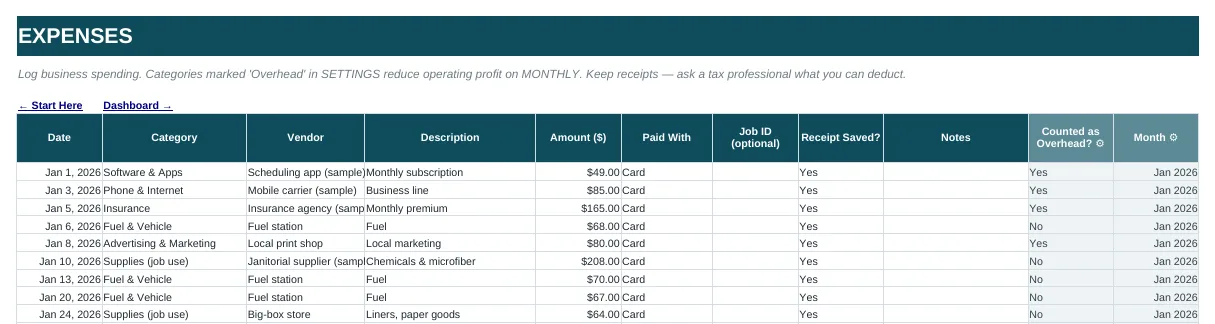
One row per purchase or bill:
- Date
- Category: from a fixed drop-down list (below), so totals add up cleanly.
- Vendor: who you paid.
- Description: what it was for.
- Amount
- Paid with: card, cash, check or bank transfer. It makes matching to statements much faster.
- Job ID (optional): link a cost to a specific job, like a carpet-machine rental for one move-out clean.
- Receipt saved? yes or no, so missing receipts stand out.
- Notes
Add two calculated columns: month (from the date) and overhead? (looked up from the category). Those two let you total spending by month and separate overhead from job costs without any manual sorting.
16 expense categories for a cleaning business
Fewer, clearer categories beat a long list nobody uses consistently. A practical starting set:
- Supplies (job use): chemicals, microfiber, trash bags, paper goods
- Equipment: vacuums, mops, steamers, carpet machines
- Fuel & vehicle: gas, maintenance, parking, tolls
- Staff pay: wages and contractor payments
- Insurance: general liability, bonding, vehicle
- Advertising & marketing: ads, flyers, door hangers, directory listings
- Software & apps: scheduling, accounting, email
- Phone & internet
- Merchant fees: card processing
- Bank fees
- Uniforms
- Office & admin: printing, postage, office supplies
- Professional fees: bookkeeper, accountant, legal
- Licenses & permits
- Training
- Other: review this monthly; if something lands here often, give it its own category
If you work with an accountant, ask them to map these to the categories they use for your tax return. It takes them a few minutes and saves hours at year end.
Overhead vs. job costs
Some costs rise with every job (supplies, labor, fuel to the job). Others stay roughly the same each month whether you clean 10 homes or 40 (insurance, software, phone, marketing). Mark each category as overhead or not. Then:
Gross profit = revenue − job costs (labor, supplies, travel, card fees)
Operating profit = gross profit − overhead
Your overhead per labor hour is a useful pricing number: monthly overhead ÷ monthly labor hours. If overhead is $1,500 and the team works 300 hours, every labor hour has to cover $5 of overhead before it makes a profit. Plug that into the cleaning quote calculator so your prices cover it.
Keep a mileage log
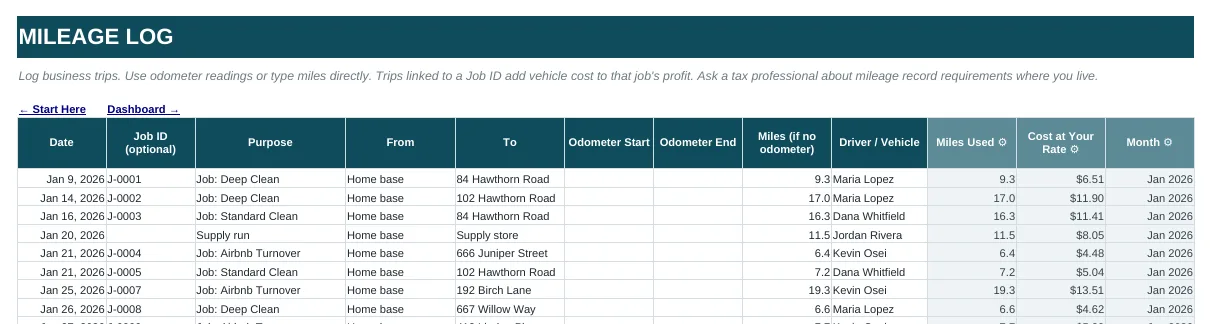
Driving between homes is one of the largest hidden costs in residential cleaning. Log each business trip:
- Date and optional job ID
- Purpose, from and to
- Odometer start and end, or miles if you don't record odometer readings
- Driver or vehicle
- Cost at your rate: miles × your cost per mile
Linking trips to a job ID shows which areas or clients cost you the most to reach. Some owners use their own fuel-and-wear estimate per mile, and others use the official standard mileage rate. That rate changes, so check the current figure on irs.gov (or your country's tax authority), and ask a tax professional which method fits your situation.
A monthly routine (about 20 minutes)
- Weekly: snap receipts and log them the same week, while you still remember what they were for.
- Month end: match the sheet against your bank and card statements and add anything missing.
- Review the totals: spending by category against last month, and anything in "Other".
- Check margins: supplies and fuel as a share of revenue. If either creeps up, it's time to adjust prices or routes.
- Restock check: compare supplies on hand with your reorder levels so you buy in bulk instead of in emergencies.
Spreadsheet or accounting software?
Accounting software connects to your bank and handles invoicing and reports for a monthly fee, and many accountants prefer it. A spreadsheet expense tracker is enough for many owner-operators, especially alongside a separate business bank account. The key is consistency: one row per expense, one category list, reviewed every month.
An expense tracker that's tied to your profit
In the Operator Grid Cleaning Business AI Growth OS, the EXPENSES, MILEAGE and SUPPLIES tabs feed the PROFITABILITY and MONTHLY views. Overhead categories reduce operating profit automatically, trips linked to a job add vehicle cost to that job, and low stock is flagged for reorder. Revenue, jobs, quotes and clients live in the same workbook.
Cleaning business expense tracker FAQ
What expense categories should a cleaning business use?
A practical set is supplies, equipment, fuel and vehicle, staff pay, insurance, advertising and marketing, software, phone and internet, merchant fees, bank fees, uniforms, office and admin, professional fees, licenses and permits, training and other. Ask your accountant to map them to the categories used for your tax return.
How do I track mileage for my cleaning business?
Log every business trip with the date, purpose, start and end points and either odometer readings or miles driven. Linking trips to a job shows which clients cost the most to reach. Ask a tax professional which records you need to keep.
What is overhead for a cleaning business?
Overhead is spending that stays roughly the same no matter how many jobs you do, such as insurance, software, phone and marketing. Divide monthly overhead by monthly labor hours to see how much each hour must cover before it earns a profit.
Is a spreadsheet good enough to track cleaning business expenses?
For many owner-operators, yes, as long as every expense is logged with a consistent category and the sheet is checked against bank statements each month. Accounting software adds bank syncing and invoicing for a monthly fee.
More guides
- Cleaning business spreadsheet: what to track
- Cleaning quote calculator and pricing formula
- Cleaning business CRM template and lead tracker
- Cleaning business client tracker
- Cleaning business plan template and outline
- Cleaning business software without a monthly fee
- Cleaning Business AI Growth OS: everything included
- Free cleaning invoice template
- Free cleaning estimate and bid template
- How much to charge for house cleaning