Operator Grid / Cleaning invoice template
Free cleaning invoice template for Excel and Google Sheets
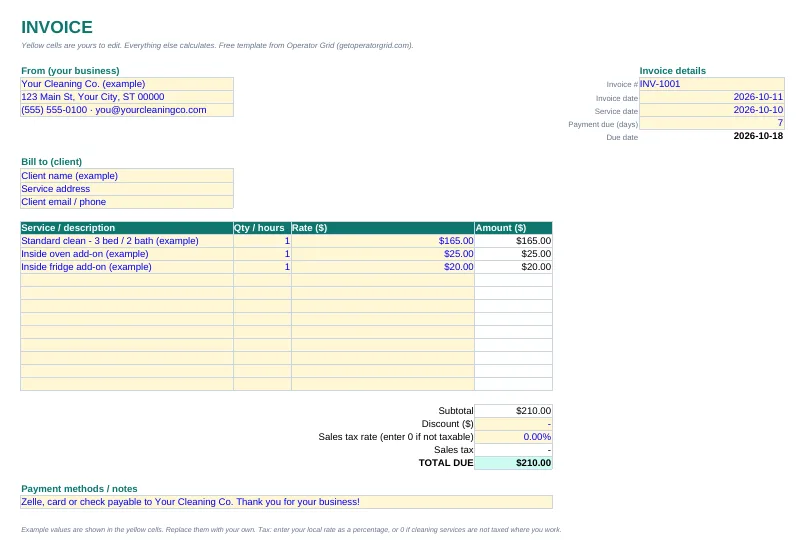
A clean, professional invoice you can send today. Add your business details once, list each service and add-on, and the totals, tax and due date calculate for you.
Download the free invoice template (.xlsx)
Works in Excel and Google Sheets (File → Import, or upload to Drive and open with Sheets). No email required.
What's in the template
- Your business and client details at the top, so every invoice looks the same.
- Invoice number, invoice date, service date and payment terms. The due date calculates from the terms you enter.
- Twelve service lines with quantity or hours, rate and an automatic amount, so add-ons like inside ovens or fridges get their own line.
- Subtotal, discount, sales tax rate and total due, all calculated. Enter 0 for tax if cleaning services are not taxed where you work.
- A payment methods and notes box for Zelle, card or check instructions.
Yellow cells are the only ones you edit. Example values are filled in so you can see the format; replace them with your own.
What every cleaning invoice should include
- A unique invoice number. Number invoices in order (INV-1001, INV-1002) so you can match payments and spot gaps.
- The service date and the invoice date. Clients and accountants both look for when the work happened.
- Line items, not one lump sum. Listing the standard clean and each add-on separately cuts down on "what is this charge?" messages.
- Clear payment terms. "Due in 7 days" or "due on receipt", plus how to pay. Vague terms invite late payment. Agree on them up front in a cleaning service contract template so every invoice matches what the client signed.
- Tax handled correctly. Whether cleaning is taxable depends on your state or country and the type of service. Check with your local tax agency or accountant rather than guessing.
How to invoice cleaning clients without the busywork
Send the invoice the same day you finish the job, while the clean is fresh in the client's mind. For recurring clients, many cleaners invoice weekly or every two weeks in one batch, or take payment on file at each visit.
Save each finished invoice as a PDF named with the invoice number and client name, and keep a simple log of invoice number, client, amount, date sent and date paid. That log is how you see who owes you money at a glance.
When a single invoice template stops being enough
An invoice template handles billing. It does not tell you which quotes turned into clients, which recurring clients are most profitable, or where your money goes each month. That is the gap the Operator Grid system fills: invoices sit alongside your leads, quotes, schedule and profit tracking in one workbook.
Common questions
Is this cleaning invoice template really free?
Yes. Download the .xlsx file directly from this page. No email or account is required.
Can I use the invoice template in Google Sheets?
Yes. Upload the .xlsx file to Google Drive and open it with Google Sheets, or use File, Import inside a blank sheet. The formulas carry over.
Should I charge sales tax on cleaning services?
It depends on where you work and the type of cleaning. Some states tax cleaning services and many do not. Check with your state tax agency or an accountant, then enter the right rate, or 0, in the template.
When should a cleaning business send an invoice?
Most send it the same day the job is finished. Recurring clients are often billed weekly or every two weeks in one invoice, or charged to a card on file after each visit.