Operator Grid / Cleaning business client tracker
Cleaning business client tracker: keep every client, visit and rebooking in one sheet
A cleaning business runs on repeat clients. A client tracker shows who you clean for, how often, what each client is worth and who is due, overdue or drifting away, so a recurring client never quietly disappears.
This guide covers the columns to use, how to track recurring plans, the four numbers worth checking every week, and a simple routine that keeps the sheet accurate. It works in Excel or Google Sheets.
Client tracker vs. lead tracker
Keep them separate. A lead tracker (CRM) follows people who haven't booked yet: inquiry, quote, follow-up, won or lost. A client tracker starts when someone books. It's about service history, rebooking and lifetime value. When a lead is marked won, add them to your client list once and never retype their details again.
Columns for your client list
One row per client. Fill the first group in by hand. The second group should be formulas that pull from your job log, so they're always up to date.
Typed in once
- Client ID: a short code like C-001, so jobs and invoices point to the right person even when two clients share a name.
- Name, phone and email
- Client type: residential, commercial, short-term rental host, property manager.
- Lead source: Google, referral, Facebook, Nextdoor, flyer. This shows which marketing brings clients who stay, not just clients who book once.
- Preferred contact: call, text or email.
- Status: active, inactive or do not service.
- Date added and notes: pets, gate codes kept somewhere secure, products to avoid, preferences.
Calculated from your job log
- First job and last job dates
- Completed jobs: the number of visits so far.
- Lifetime revenue: everything this client has paid you.
- Balance due: anything invoiced and not yet paid.
- On a recurring plan? yes or no.
- Days since last job: the early-warning number for clients who are drifting.
- Suggested next action: for example "ask for a review", "book next visit" or "send a reactivation offer".
Keep property details (address, size, bedrooms, bathrooms, access notes) in their own tab. One client can have several properties, especially rental hosts and property managers.
Track recurring plans separately
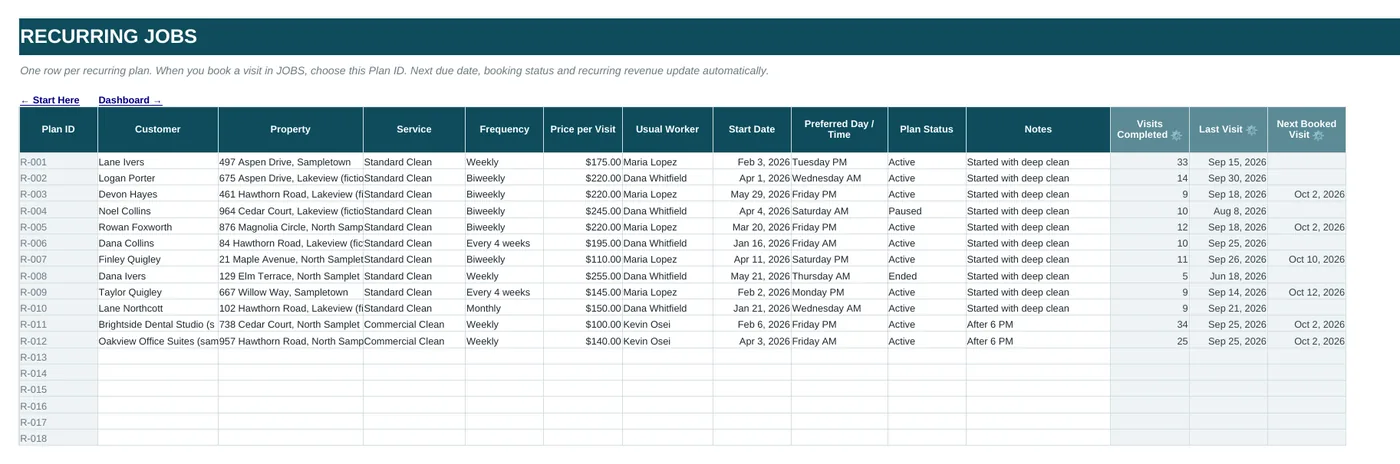
Recurring clients are where the steady income is, so give each recurring plan its own row:
- Plan ID, client and property
- Service and frequency: weekly, biweekly, every four weeks, monthly
- Price per visit and usual cleaner
- Start date and preferred day or time
- Plan status: active, paused or ended
- Next visit due and days until due, calculated from the last visit and the frequency
- Booking status: booked, upcoming or overdue
- Monthly value: price per visit × visits per month
Monthly value = price per visit × visits per month
Weekly ≈ 4.33 visits a month · Biweekly ≈ 2.17 · Every four weeks ≈ 1.08 · Monthly = 1
Example: a biweekly clean at $220 is worth about $220 × 2.17 = $477 a month, or roughly $5,720 a year. Seeing that number makes it obvious why a quick reschedule call is worth more than a new flyer.
Four numbers to check every week
- Overdue recurring visits: any plan past its due date with no visit booked. Book these first.
- Clients with no job in 60–90 days: one-time and lapsed clients who could be invited back with a seasonal or deep-clean offer.
- Unpaid balances: follow up while the job is still fresh.
- Total monthly recurring value: the sum of active plans. If it grows month over month, the business is getting more stable.
Pick your own reactivation window. Ninety days is a sensible starting point for one-time clients. Shorten it for clients who used to book often.
A 10-minute weekly routine
- Monday: sort recurring plans by days until due and book anything overdue or due this week.
- After each job: log it with the client ID, the price and whether it was paid. Everything else updates from that row.
- Friday: filter clients by days since last job and send two or three reactivation or review-request messages.
- Monthly: check total recurring value and which lead sources produced clients who stayed.
Turn one-time cleans into recurring clients
The best moment to offer a plan is right after a first deep clean, when the home looks its best. Track which one-time clients you've asked, and record the answer. Over a few months you'll see your own conversion rate, and which offers (a lower biweekly price, a fixed day, the same cleaner each time) actually work for your area.
Spreadsheet or client management software?
Booking software adds online scheduling, automatic reminders and card-on-file payments for a monthly fee. A spreadsheet client tracker covers the essentials if you or a small team do the scheduling, and you own the data outright. Many owners start with a sheet and move to software once several people are booking jobs at the same time. See cleaning business software without a monthly fee for that comparison.
A client tracker that's already connected
In the Operator Grid Cleaning Business AI Growth OS, the CUSTOMERS and RECURRING tabs are linked to the job log, so lifetime revenue, balance due, last job, next visit due, booking status and monthly value fill in automatically. A suggested next action appears for each client, and the same workbook holds leads, quotes, scheduling, expenses and profit.
Cleaning business client tracker FAQ
What should a cleaning business client tracker include?
At minimum: client name and contact details, client type, lead source, status, property details, first and last job dates, number of completed jobs, lifetime revenue, balance due and whether the client is on a recurring plan. Recurring plans should also track frequency, price per visit and the next visit due.
How do I calculate the monthly value of a recurring cleaning client?
Multiply the price per visit by the average visits per month: about 4.33 for weekly, 2.17 for biweekly, 1.08 for every four weeks and 1 for monthly. A $220 biweekly clean is worth about $477 a month.
When should I reach out to a client who stopped booking?
Many owners use a window of 60 to 90 days since the last job for one-time clients, and a shorter window for clients who used to book regularly. Track days since the last job so the list builds itself.
Can I use Google Sheets for a cleaning client tracker?
Yes. A client tracker built with standard formulas works in Google Sheets and in Microsoft Excel. Keep one row per client, one row per recurring plan and one row per job, and link them with a client ID.
More guides
- Cleaning business spreadsheet: what to track
- Cleaning quote calculator and pricing formula
- Cleaning business CRM template and lead tracker
- Cleaning business expense tracker and mileage log
- Cleaning business plan template and outline
- Cleaning business software without a monthly fee
- Cleaning Business AI Growth OS: everything included
- Free cleaning invoice template
- Free cleaning estimate and bid template
- How much to charge for house cleaning